This is a thread snapshot. The living document lives at the
source URI above — it may have been edited, extended, or replied-to
since.
Scan for living source
SSH Tunnel for HTTP Traffic
Are You stuck behind a firewall?
Does your school, library, work, or parents control where you surf
and what ports you have open? Do you surf on such public domains and
need more privacy? Are you sick of failing proxies? If you answered 'Y'
to any of these questions then this tutorial is for you.
My Story
My place of employment has a firewall and it blocks nearly all
outbound protocols and many great sites, such as foxhop.net or youtube.com. I need a way to get around the blocks
and not get caught.
Sections
Common Questions
What is the best way to get around a firewall?
Create an SSH tunnel from the work network to your home network.
My network administrator is smart, will I get
caught?
No, you will most likely not get caught. All the firewall sees is a
connection to a resource on the internet. When you browse the web using
the tunnel all traffic is encrypted. If a network administrator captured
packets he would only get garbage data. An SSH tunnel is basically a VPN
between two computers or networks. 1337
Can a network admin stop a person or computer from
tunneling?
The Admin will typically not know about the tunnel. From his view a
tiny connection is being placed and is normally overlooked. The admin
does have the ability to block the default SSH port 22. You can build
your tunnel over any port (80 or 443).
Article Scope
We will discuss the steps of building an SSH Tunnel for HTTP traffic
between two computers on different networks. This guide will cover both
windows and linux localhosts.
Throughout this guide I will use the following terms, here are the
definitions:
localhost
The computer at work or school.
remotehost
The computer or server that is offsite, which has the SSH server
running.
What you need ...
Credentials to a remotehost running an SSH server.
(openssh-server)
A localhost computer crippled by a pesky network firewall.
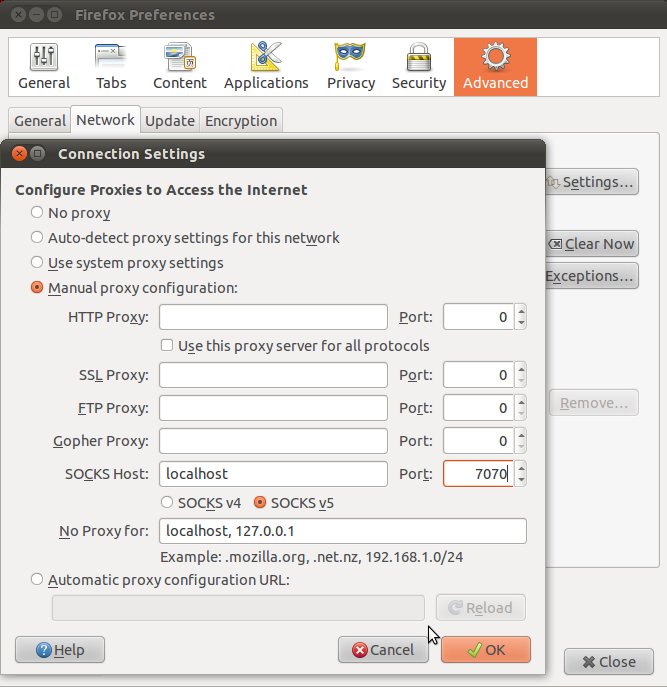
You should now be able to browse the Internet using your remote
connection. All data will be passed through the remote hosts internet
connection. All traffic will be encrypted between the localhost and the
remotehost.
network.proxy.socks_remote_dns user set boolean true
Remote port
forwarding a service over tunnel
In this scenario we are running a development web server (port 8888)
on our workstation (joe) from our home network. We would like to grant
access to this development web server to people on the work network. We
have ssh access to a host (mary) on the work network.
We must enable GatewayPorts in mary:/etc/ssh/sshd_config to allow
binding to 0.0.0.0 instead of 127.0.0.1:
# Allow this host to bind forwarded ports to 0.0.0.0 instead of 127.0.0.1
# Service will appear to run on this host, but will get forwarded over tunnel
GatewayPorts yes
We create a remote port forwarding tunnel from joe to mary:
# -g means gateway -R means remote port forwarding
# prompt:~$ ssh -g -R <remote-port>:<localhost>:<local-port> <user>@<remote-host>
user@joe:~$ ssh -g -R 8888:127.0.0.1:8888 user@mary
When the tunnel opens, verify that mary is binding/listening to
0.0.0.0:8888: